

-
Businesses that use virtual cards for SaaS usually recover anywhere between 7% and 40% of wasted software spend through renewal visibility, tighter controls, and cleaner expense management.
-
Most of the savings generally come from eliminating duplicate subscriptions, improving accountability across multiple teams, and reducing automatic renewals.
-
Having a dedicated virtual card per vendor allows for better visibility into business expenses, reduces administrative overhead, and simplifies reconciliation.
-
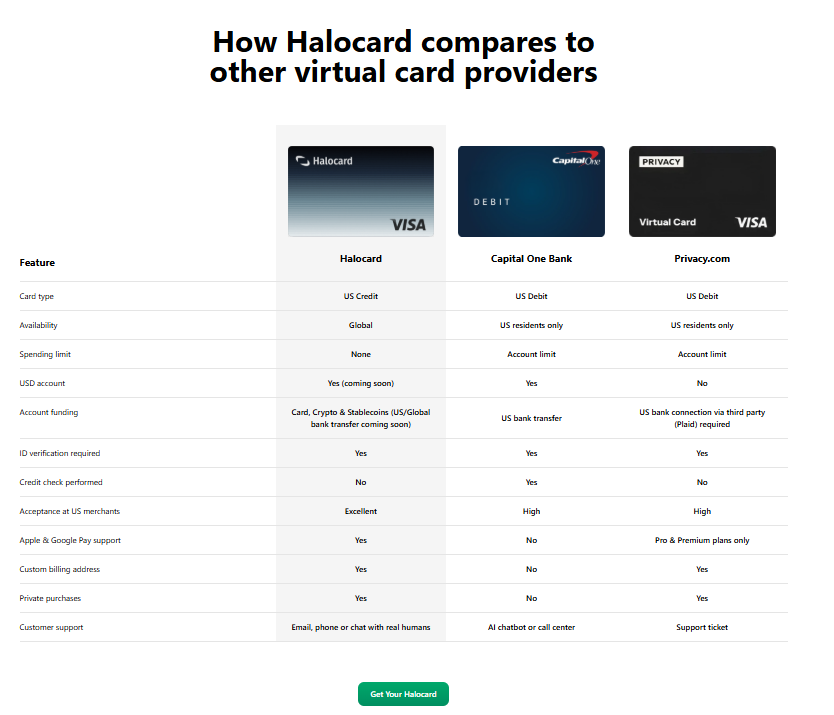
Halocard is particularly well suited for international companies managing US software subscriptions thanks to its US-issued Visa access, global availability, and granular spending limits.
A single forgotten SaaS renewal rarely breaks a business, but 50 forgotten renewals can. That's a big problem for finance leaders, especially as companies grow. New teams buy new software and employees often expense tools on personal cards. Various departments subscribe to overlapping platforms. Then, a few months down the road, nobody remembers which of these subscriptions are still being used.
Most companies only discover this problem when finance teams start reviewing bloated credit card statements, rising operational costs, and duplicate invoices. That said, by the point finance teams notice, software spend has already become messy and over budget.
This is the exact reason why many businesses are shifting to using virtual cards for SaaS. Instead of software purchases being random expenses, virtual cards create structure around ownership, subscriptions, and renewal decisions. They turn SaaS spending into something that businesses can actually track and control.
How Much Do Companies Typically Waste on SaaS?
According to Zylo's 2026 SaaS Management Index, the average organization wastes millions annually on unused software licenses. The average company uses just 54% of purchased SaaS licenses, leaving roughly 46% of licenses underutilized or completely unused. Also, according to JumpCloud, the average organization wastes over $135,000 on unused licenses.
Even smaller businesses have serious waste problems. Many discussions around SaaS management regularly mention forgotten renewals, duplicate tools, and unused software subscriptions that pile up month after month. In one particularly widely discussed thread, one user reported finding $3,000 per month in unused subscriptions, and this was in the first month of switching to a one-card-per-tool system.
That said, the issue isn't just unused software, but also structural chaos. Many businesses manage subscriptions using shared physical corporate cards, scattered departmental purchases, or employee reimbursement workflows.
Over a period of time, this creates:
-
duplicate software across departments
-
weak accountability
-
hidden business expenses
-
slow reconciliation process workflows
-
poor renewal oversight
-
increased fraud risks
This can start becoming especially expensive as a business grows and more departments have independent purchasing habits. SaaS sprawl is now so common that there are entire software categories designed to manage it.
There are many tools designed to reduce software waste, surface unused subscriptions, and improve governance. The operational side is also important, as many businesses lose significant time chasing invoices, untangling overlapping billing cycles, and manually categorizing subscriptions.
This is where virtual cards become extremely important for recurring software spending. Unlike regular or traditional corporate cards, a dedicated digital card for each vendor creates accountability at the payment level.
Instead of one giant statement that is filled with dozens or even hundreds of software charges, businesses gain better ownership tracking, easier cancellation management, cleaner expense category allocation, faster real-time transaction tracking, and stronger renewal visibility. This kind of operational visibility is where the real savings generally start.
Six Ways Virtual Cards Cut SaaS Costs
There are six specific ways in which virtual cards help cut SaaS costs.
1. Per-Vendor Spending Limits Create Hard Cost Controls
One of the biggest benefits of virtual cards is that they feature granular spending control. With virtual cards, businesses are able to assign a dedicated card to each software vendor and set spending limits that match the expected subscription cost.
If the vendor happens to increase pricing or attempt unauthorized upgrades, the transaction will automatically fail. This is much stronger control than having to rely on broad company-wide corporate card limits.
2. Forgotten Renewals Become Visible
Subscriptions often disappear into large monthly statements when businesses use shared physical cards. However, with a dedicated virtual card provider, that changes, as every subscription is isolated and easy to identify.
Finance teams can easily spot duplicate tools, overlapping software, unused licenses, dormant accounts, or old subscriptions. This helps improve overall real-time visibility and allows businesses to monitor expenses before costs spiral out of control.
3. Cancellation Forces Renewal Decisions
One of the most effective cost control mechanisms with virtual cards is psychological. Because each subscription has its own digital version of a payment card, businesses become much more intentional and aware of renewals.
Teams have to actively decide whether a tool still deserves an active card. This helps interrupt passive spending habits caused by invisible automatic renewals. Most businesses report saving anywhere between 30% and 40% on SaaS after using structured quarterly reviews tied to dedicated cards.
4. Shadow IT Becomes Easier to Detect
One of the biggest driving factors of hidden SaaS costs is shadow IT. This means that employees often purchase tools independently using personal cards or departmental budgets.
Over a period of time, businesses lose visibility into what's running across the organization. With dedicated cards for SaaS, visibility is improved because every subscription flows through a centralized payment infrastructure. This gives finance teams much better control over duplicate software, vendor payments, departmental spending, compliance oversight, and unauthorized tools.
5. Vendor Disputes Become Easier
Virtual cards create leverage because if a vendor continues billing after cancellation or makes disputed charges, businesses can terminate or freeze a specific card immediately without disrupting unrelated business payments.
Unlike other traditional payment methods, companies don't need to replace a primary account after a single dispute. This type of isolation improves both security and operational control.
6. Reconciliation Time Drops Significantly
The other main benefit is that because manual SaaS accounting is very time-consuming, finance teams generally spend hours reviewing invoices, assigning costs, updating spreadsheets, and processing expense reports.
That changes with dedicated virtual cards, because they help streamline reconciliation. This improves accounting accuracy, audit readiness, operational efficiency, time efficiency, and financial reporting quality.
Worked Examples: Savings by Company Size
Here are some hypothetical examples of how much money a company can save by using virtual cards for business expense management.
10-Person Startup
A small remote startup that uses just 15 SaaS tools might assume that software costs are lean, when in reality, smaller companies frequently suffer from fragmented purchasing and very weak oversight. For small companies, the biggest gains generally come from eliminating forgotten subscriptions and improving ownership visibility. A dedicated virtual card per vendor also prevents trial subscriptions from converting into recurring charges after the initial expiry date passes.
Hypothetical example for illustration.
| Input | Figure |
|---|---|
| Monthly SaaS Spend | $3,500 |
| Duplicate/Unused Tools | 12% |
| Estimated Renewal Waste | $250/month |
| FX & Payment Fees | $120/month |
| Admin Time Savings | 5 hours/month |
| Estimated Annual Savings | ~$7,000 |
50-Person Company
A mid-sized business typically experiences the worst SaaS sprawl because departments start purchasing independently while finance infrastructure is still lightweight. At this company stage, dedicated virtual cards provide much stronger governance. Finance teams get real-time tracking, faster identification of overlapping marketing platforms, project software, and communication tools, plus stronger budgeting controls. Operational improvements also become noticeable.
Hypothetical example for illustration.
| Input | Figure |
|---|---|
| Monthly SaaS Spend | $18,000 |
| Duplicate Software Spend | 18% |
| Annual Renewal Waste | $14,000 |
| Finance/Admin Time Saved | 10 hours/month |
| Estimated FX Savings | $4,000/year |
| Estimated Annual Savings | ~$38,000 |
200-Person Company
Large organizations often have hundreds of recurring subscriptions across many currencies, regions, and departments. At enterprise scale, virtual cards are a serious governance mechanism, not just a payments tool. Dedicated cards help improve audit preparation, vendor payment management, procurement visibility, department accountability, and SaaS renewal management. This is very important for global companies that manage subscriptions across multiple regions, employees, and currencies.
Hypothetical example for illustration.
| Input | Figure |
|---|---|
| Monthly SaaS Spend | $85,000 |
| Estimated Waste Rate | 15% |
| Duplicate Licenses | $9,000/month |
| AP & Reconciliation Savings | 20 hours/month |
| Estimated FX Savings | $18,000/year |
| Estimated Annual Savings | ~$190,000 |
How to Calculate Your SaaS Virtual Card ROI
Let's now find out how to calculate the ROI you'll gain from using a virtual card for SaaS subscriptions.
Step 1: Inventory Every SaaS Subscription
First, identify every active software subscription across the business. Many businesses underestimate how many tools they pay for.
-
Shared corporate card charges
-
Employee reimbursements
-
Departmental purchases
-
Trial subscriptions
-
Hidden recurring services
Step 2: Classify Software by Ownership and Usage
The next step is to assign ownership, with every subscription having:
-
A responsible team
-
A business purpose
-
A defined budget
-
A renewal review process
This kind of accountability helps reduce human error.
Step 3: Estimate Recoverable Spend
Many businesses can recover anywhere from 10% to 25% of SaaS spend quickly once visibility improves, so look for:
-
Duplicate subscriptions
-
Inactive users
-
Unused licenses
-
Forgotten tools
-
Excess seat counts
-
FX fee leakage
Step 4: Compare Savings Against Platform Cost
The final step is to compare the estimated savings against the cost of implementation. For the vast majority of companies, the savings from reduced admin work, eliminated waste, and better controls outweigh the platform cost.
Why Halocard Works for Global Teams Managing US SaaS Spend
A big issue is that international companies often struggle with US software billing. They generally have issues paying for subscriptions that are based in the USA. Foreign cards often don't work due to BIN and address issues. Many SaaS vendors prioritize US-issued payment credentials and often reject international debit products or require US billing addresses.
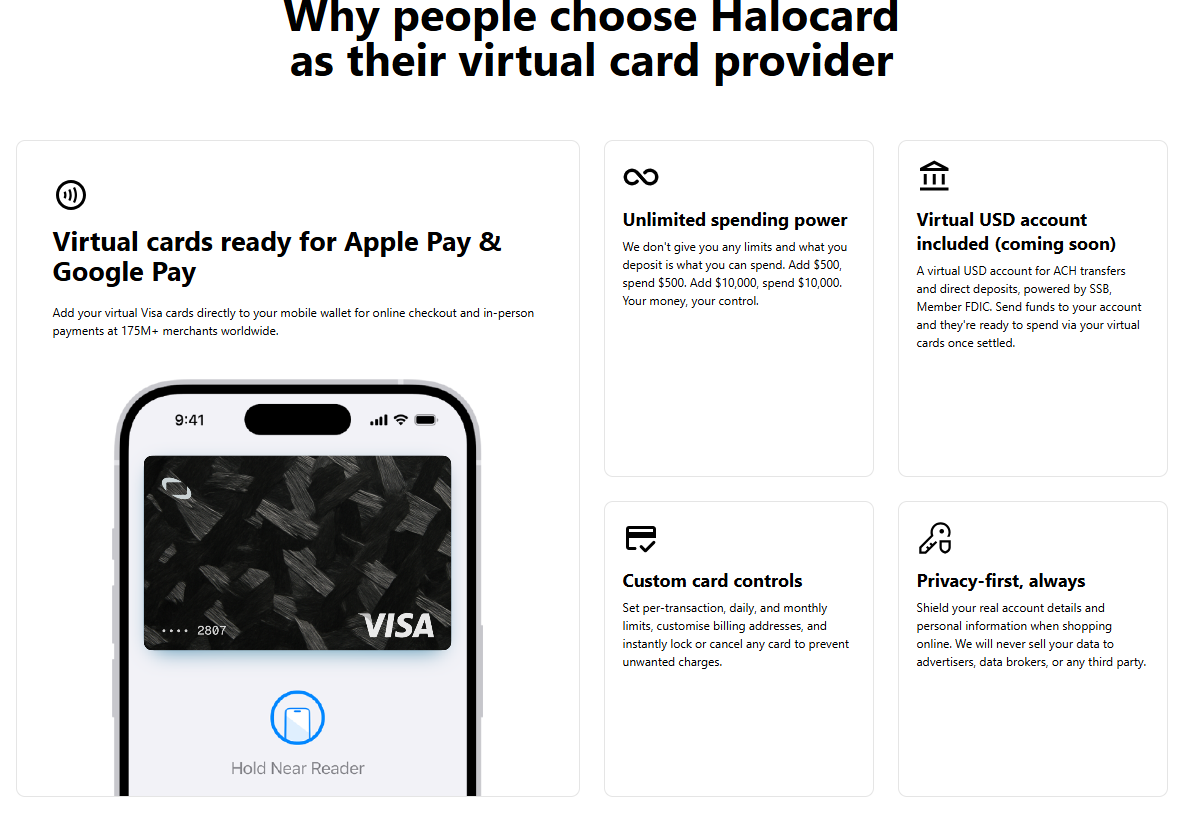
Halocard solves this problem through various key advantages:
-
US-issued Visa access
-
Availability in 144 countries
-
No US SSN requirement
-
Teams plan supports up to 60 cards
-
Cards created instantly
-
Strong support for recurring SaaS payments
Due to all of these reasons, Halocard is very useful for agencies, global startups, and remote companies that manage subscriptions across multiple vendors. Unlike the majority of traditional corporate cards, Halocard allows businesses to create isolated payment systems for different tools, workflows, or departments.
This means that businesses can:
-
Set limits per vendor
-
Separate departmental spending
-
Improve subscription governance
-
Reduce unauthorized renewals
-
Gain more control over software budgets
Frequently Asked Questions
How Much Can Businesses Realistically Save With Virtual Cards for SaaS?
Most businesses will save anywhere from 7% to 40% of SaaS spend depending on how much waste already exists.
Are Virtual Cards for SaaS Compatible With Most Software Vendors?
Yes, most SaaS vendors accept virtual Visa or MasterCard payments.
Are Virtual Cards Better Than Physical Corporate Cards for SaaS?
Usually, yes, virtual cards are better for SaaS than physical corporate cards because they provide stronger control for recurring software subscriptions.
Can Businesses Set Spending Limits on Each Digital Card?
Yes, most providers allow businesses to set spending limits per card, billing cycle, or per vendor.
Do Virtual Cards Protect Against Vendor Overcharges?
Yes, a virtual card protects against overcharges because businesses can terminate one vendor without affecting unrelated subscriptions, or freeze or pause cards at any time.
Are There Limitations Compared to Physical Cards or Traditional Credit Cards?
Yes, there are some limitations to virtual cards, with the main one being that they are optimized for online subscriptions, rather than hotels, travel, or heavy in person purchasing.
Are Virtual Cards Safe for Annual SaaS Subscriptions?
Yes, there are many virtual cards that are safe for annual SaaS subscriptions, such as Halocard.
Does Halocard Require a US Credit Check or SSN?
No, Halocard is available globally and does not require non-US users to have a US SSN or US credit history.
Sources
-
Cardboard. Virtual cards for SaaS payments drive automation & efficiency | Cardboard
-
Reddit. how do you manage virtual cards for SaaS subscriptions? : r/SaaS
-
Reddit. $21 million annually wasted on unused SaaS. Here's how to see it (and stop it). : r/FinOps
-
Saas Capital. 2025 Spending Benchmarks for Private B2B SaaS Companies - SaaS Capital
-
Ortto. How Much Does SaaS Tool Sprawl Cost? The Hidden Budget Impact for SaaS Companies - Ortto
-
JumpCloud. 2025 SaaS Usage Statistics: How Much is Too Much? - JumpCloud
Sources checked on May 7, 2026.
*Please see Halocard's Terms of Service or Pricing for the most up to date pricing and fee information. This publication is provided for general information purposes and does not constitute legal, tax or other professional advice from Halocard LLC or its subsidiaries and its affiliates, and it is not intended as a substitute for obtaining advice from a financial advisor or any other professional. We make no representations, warranties or guarantees, whether expressed or implied, that the content in the publication is accurate, complete or up to date.
Halocard Virtual Cards


Instant approval
Create your first card in under 5 minutes.

Private purchases
Purchases never appear on your bank account.

Powered by Visa
Accepted at 175M+ merchants globally.
How to get a virtual credit card in 3 simple steps
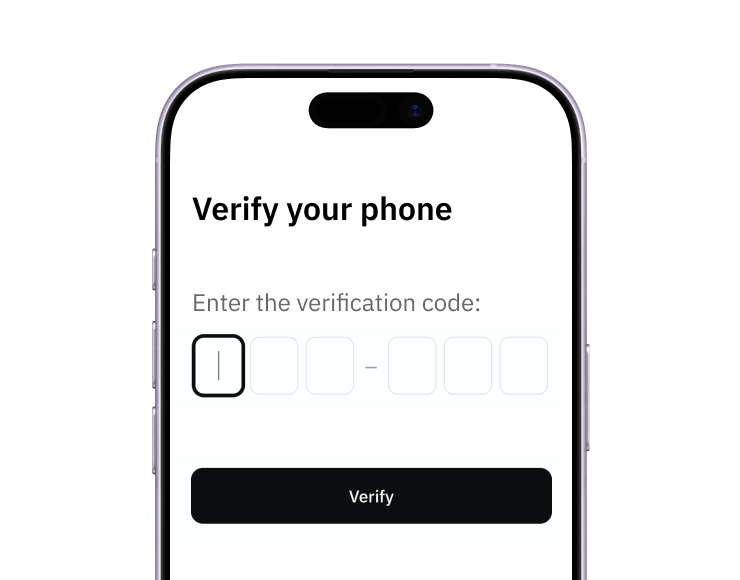
1. Sign-up with a phone
Sign up from your browser. No app download needed.

2. Quick identity check
Verify you're a real person in less than 3 minutes. No US residency required.
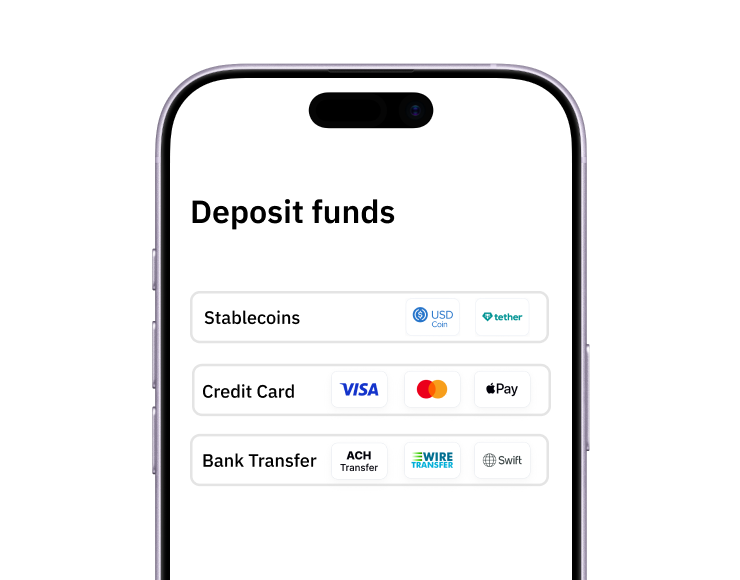
3. Add funds to your account
Use stablecoins, debit/credit card or ACH/SWIFT bank transfer (coming soon).
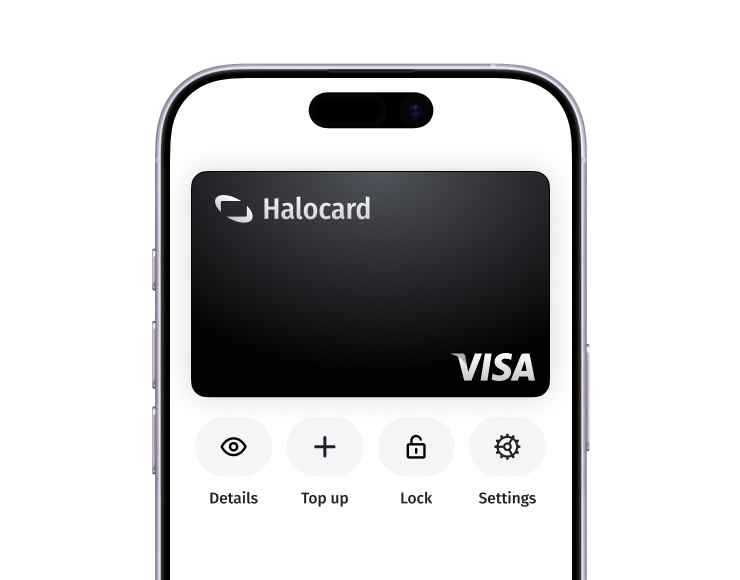
Your virtual card is ready.
That's it! Your virtual cards can now be used for online and in-person purchases anywhere in the world where Visa is accepted.